> ## Documentation Index
> Fetch the complete documentation index at: https://docs.gifty.lat/llms.txt
> Use this file to discover all available pages before exploring further.
# Issue a gift card and verify delivery
> From the gift to its recipient, with an outcome you can check.
Issuing a gift card creates value. Delivery sends that same gift card to its recipient. **If delivery fails, do not issue another gift card to fix it**: first check the existing operation.
## Before you start
Prepare the amount, design and recipient details. Check the channel and, for a scheduled gift, the chosen date. Available actions depend on your permissions and the state shown by your store.
## 1. Prepare the gift
Open **Gift cards → Issue**. Complete the form and review the recipient, amount, message and delivery mode before confirming. Secret gifts and corporate gifts are different options: check the preview to understand their presentation.
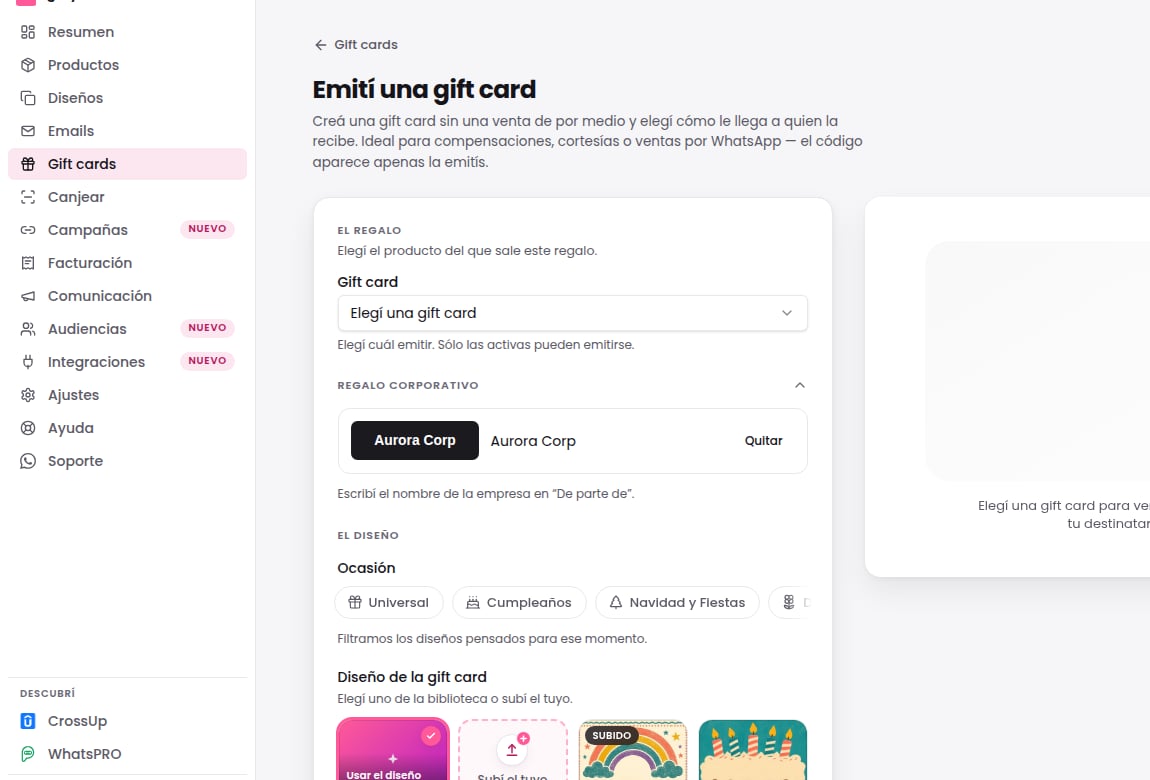 *Screenshot of the gifty harness in Spanish, using fictional data. The image illustrates the interface; the steps on this page explain the complete procedure in English.*
## 2. Confirm and keep the reference
Confirm once and follow the operation that was created. If the interface is still processing, check that operation before starting another. Issuance and delivery have different states: a gift card existing does not prove the recipient received it.
## 3. Check the delivery history
Open the operation details and review its history. **Queued does not mean delivered.** Check the channel and reported outcome before telling the recipient delivery is complete.
*Screenshot of the gifty harness in Spanish, using fictional data. The image illustrates the interface; the steps on this page explain the complete procedure in English.*
## 2. Confirm and keep the reference
Confirm once and follow the operation that was created. If the interface is still processing, check that operation before starting another. Issuance and delivery have different states: a gift card existing does not prove the recipient received it.
## 3. Check the delivery history
Open the operation details and review its history. **Queued does not mean delivered.** Check the channel and reported outcome before telling the recipient delivery is complete.
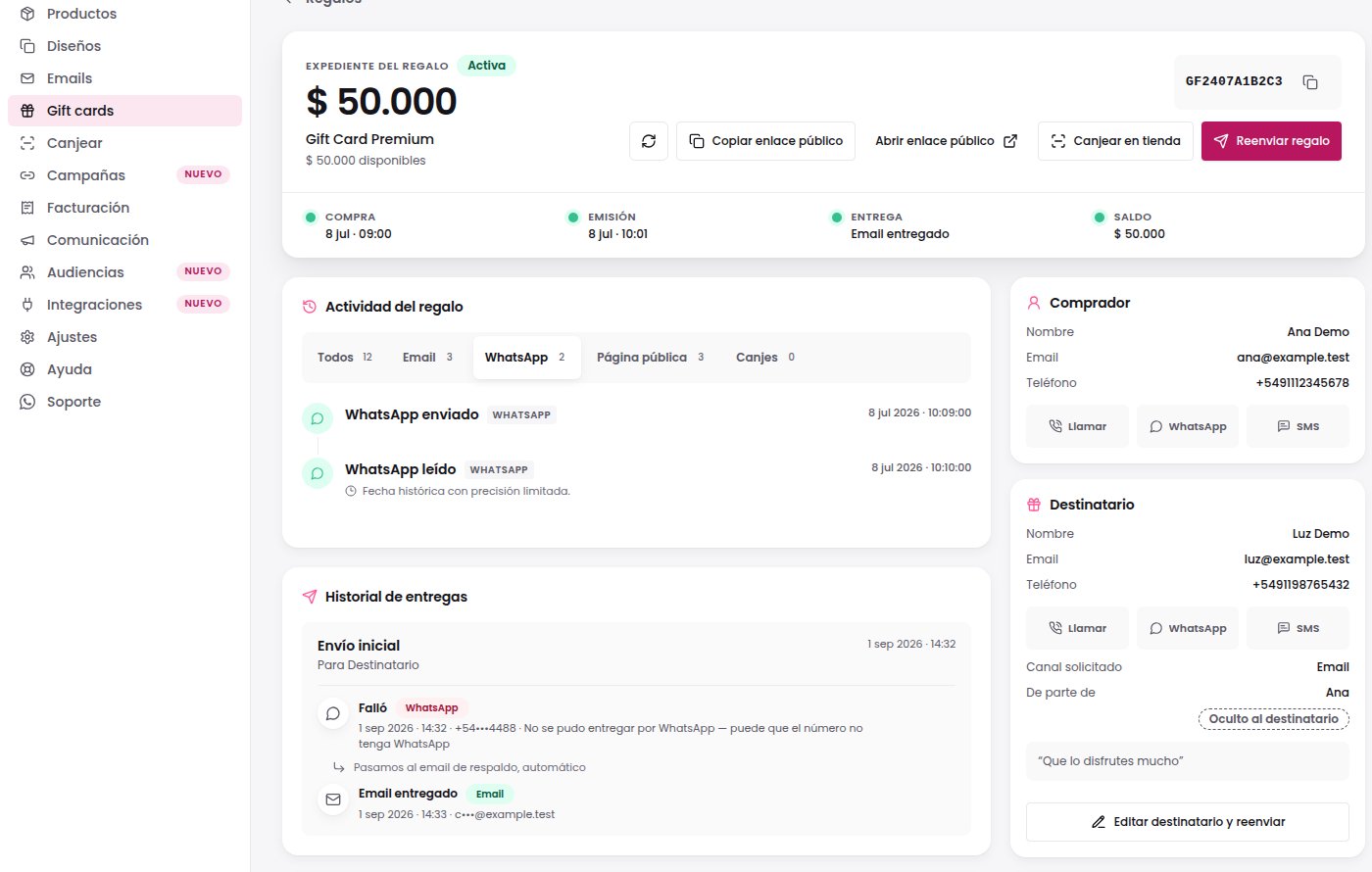 *Spanish screenshot of a fictional recovery scenario. A sample result does not guarantee delivery in a real case.*
## If the message did not arrive
| What you see | What to do |
| ----------------------------------------------------- | ------------------------------------------------------------------------------------------------------------------- |
| The operation is processing or waiting for its coupon | Check the same operation. Do not create another to force delivery. |
| Delivery failed and a retry action is available | Retry that gift card. This creates another delivery attempt, not another gift card. |
| WhatsApp failed | Check the history and recovery channel shown by the operation. An email still in the queue is not a received email. |
| An unclear state or no retry action | Ask for help with the operation reference and the steps already tried. |
Do not share a complete gift card code in a public channel: it allows its value to be used. This pilot does not send support messages.
## Expected outcome
You finish with an identifiable operation and a verified delivery outcome. If it remains pending, follow or recover that operation instead of duplicating the gift.
[Understand balances and partial redemption](/en/balance) · [See the complete lifecycle](/en/gift-lifecycle)
[Read this page as Markdown](/exports/en/issue-and-deliver.md)
Copy this outline and fill it with what you see. Do not include the full gift code or personal data.
```text theme={null}
Visible status: failed delivery
Steps tried: checked recipient and delivery history
Retry result: awaiting confirmation
```
*Spanish screenshot of a fictional recovery scenario. A sample result does not guarantee delivery in a real case.*
## If the message did not arrive
| What you see | What to do |
| ----------------------------------------------------- | ------------------------------------------------------------------------------------------------------------------- |
| The operation is processing or waiting for its coupon | Check the same operation. Do not create another to force delivery. |
| Delivery failed and a retry action is available | Retry that gift card. This creates another delivery attempt, not another gift card. |
| WhatsApp failed | Check the history and recovery channel shown by the operation. An email still in the queue is not a received email. |
| An unclear state or no retry action | Ask for help with the operation reference and the steps already tried. |
Do not share a complete gift card code in a public channel: it allows its value to be used. This pilot does not send support messages.
## Expected outcome
You finish with an identifiable operation and a verified delivery outcome. If it remains pending, follow or recover that operation instead of duplicating the gift.
[Understand balances and partial redemption](/en/balance) · [See the complete lifecycle](/en/gift-lifecycle)
[Read this page as Markdown](/exports/en/issue-and-deliver.md)
Copy this outline and fill it with what you see. Do not include the full gift code or personal data.
```text theme={null}
Visible status: failed delivery
Steps tried: checked recipient and delivery history
Retry result: awaiting confirmation
```