In staging validation: confirmation and review
Confirmation reads the current coupon from TiendaNube again. If its quota is exhausted or cannot be verified, redemption stops before debiting the balance. A coupon with previous uses and remaining quota can still support a legitimate partial redemption. If the coupon invalidation outcome cannot be confirmed, ask for help reviewing the attempt. Do not repeat it with a new reference or restore the coupon yourself: an uncertain response may describe an operation that did happen. Operational review is not available as automatic recovery.This redemption is under review
When the outcome is uncertain, the counter screen shows the “This redemption is under review” notice. That notice offers no retry. It differs from “Tiendanube isn’t responding”, which does propose another attempt, and from “We lost the connection to your store”, which asks you to reconnect the app. In that state the gift card balance was not taken off. The gifty team reviews the case and lets you know once it is resolved. Do not redeem that code again until then: repeating it can apply the discount twice on the coupon. The notice gives two ways out. “Back to redemption” returns you to the code entry, so you can serve another customer. “Write to us” opens the WhatsApp support chat with your store details already filled in. The same channel is under “Support” in the side menu.Before you start
Return to the same code or detail. A visible error does not prove every external step was undone.Step by step
- Read the reason: not found, used, expired, migrated and out-of-sync coupon are different blocks.
- A temporary TiendaNube failure may allow retry; a disconnected store requires reconnection.
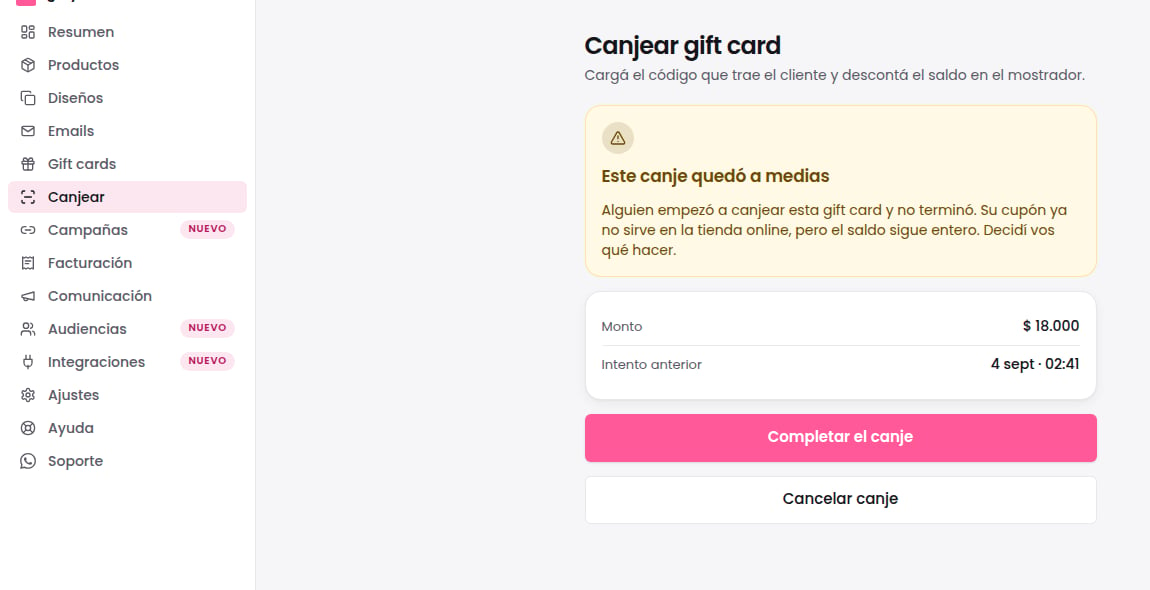
- For a pending attempt, choose complete or cancel using the available action.
- After acting, check receipt, balance and coupon state.
How to verify the result
Canceling a pending attempt restores online coupon availability. It does not reverse a completed redemption, which cannot use this cancellation.If something goes wrong
- Counter redemption invalidates the coupon before debiting. A later failure can leave recovery pending; do not promise instant rollback.
- Waiting does not automatically cancel the attempt. Resolve it before starting another checkout.
What to do with each rejection
Recover a pending attempt using the same code or detail. Choose complete or cancel according to what happened at the counter. Cancelling a pending attempt recovers the online coupon; check that synchronization finishes. It cannot undo an already completed redemption.
An online redemption that couldn’t be applied
Sometimes Tiendanube applies a gift card coupon on an order and gifty can’t record the redemption. It happens, for example, when the order used more than one coupon or the discount exceeded the balance. That redemption isn’t guessed: it stays under review and gifty doesn’t move the balance on its own. If the gift card was migrated from the previous system, the case doesn’t show on the home: the Gifty team reviews it.- The home warns you at the top: “A redemption couldn’t be applied on order #1043.”, with the reason.
- If the redemption didn’t move the balance, the notice says “The gift card is still intact.”. If the order was cancelled or had a partial refund, or if the balance can’t be confirmed, it says “We’re looking into it.”.
- Tap Review to open the gift card’s page and check its redemption history.
- Don’t redeem that code again at the counter to “fix” it: you could deduct the balance twice. The notice goes away when gifty records the fix.
Manual closure by support
After reviewing the case, support can close the notice for that order with a reason from a closed list. The details stay in the case’s ticket. The closure is audited and removes the notice from that store’s home. Closing the notice does not record a redemption, change the balance or modify the coupon in Tiendanube. Ask support to confirm what happened to the order before using the code again. Repeating the closure does not create another record.Recognize a pending attempt