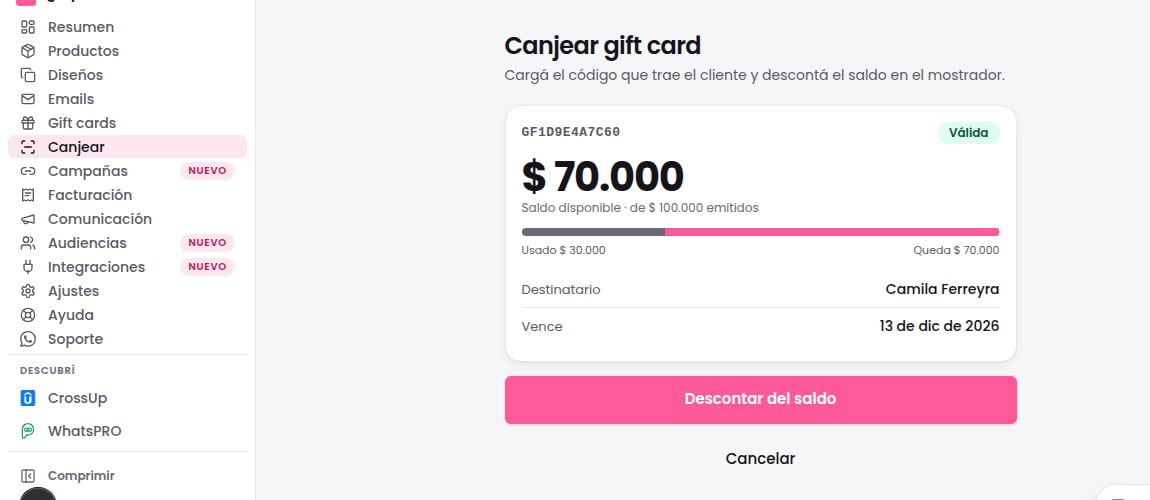
Read redemption in the new appearance
Redeem uses Sobre’s warm paper, white cards and Instrument Sans typography. Amounts are shown with aligned digits and confirmation uses an ink-colored action. Review the labels and amount of the same gift before confirming redemption.Before you start
Open Redeem. Enter the code, scan the QR or arrive from a detail with the code prefilled.Step by step
- Verify the gift card and review store, expiry and available balance.
- If partial redemption applies to this gift, enter a positive amount no greater than its balance. Review before and after amounts. Otherwise redemption is full.
- Add an optional note and confirm.
- Check the receipt and remaining balance before considering checkout complete.
How to verify the result
The receipt confirms the recorded redemption. Looking up or scanning a code alone does not consume balance.What your customer sees
The gift page tells your customer to use the code at your online store checkout. It does not mention redemption at a physical store. If you serve customers at a store, your customer shows you the code or its QR and you redeem it from Redeem.If something goes wrong
- If the TiendaNube embedded camera is blocked, open full Gifty or type the code; camera access is optional.
- If balance changes during confirmation, verify again and adjust the amount. Do not retry blindly.
Recognize the balance before redeeming